
Maintenance management
Maintenance work orders: what they are, what goes on the form, and the workflow
In many plants, the work order is treated as a form you fill in so the job can start. Yet a set of properly completed work orders is the only honest record of what actually happened to the machines. This article covers what a good work order contains, how it moves through its workflow, and why its small details decide whether maintenance data can be used at all.

Key takeaways
- A maintenance work order is a written instruction that ties one maintenance job to one asset, together with its plan, the people doing it, and the result.
- A work request can come from anyone who sees a problem; a work order is issued only once that request has been reviewed, approved, and planned.
- A good form is not long, but it makes the data needed for analysis mandatory: failure codes, actual labor hours, downtime, and verification.
- A work order is truly closed only once its result has been verified. A technician marking it "completed" does not yet prove the problem is gone.
What a maintenance work order is
A maintenance work order is a written instruction that authorizes and directs one maintenance job on a specific asset. It records the asset being worked on, the problem being addressed, who does the work, when, with what materials, and what the outcome was. On the plant floor it is often simply called a "WO", or in Indonesian plants a perintah kerja or SPK.
EN 13306 reminds us that maintenance covers technical, administrative, and managerial actions, not only work done with a wrench[1]. The work order is where the three meet. Its technical side lies in the job plan and the findings in the field. Its administrative side lies in the number, the status, and the signatures. Its managerial side appears when hundreds of work orders are added up into a picture of workload, cost, and asset reliability. Palmer places the work order at the center of the planning and scheduling system: work is identified, planned, scheduled, and its history kept through the same document[2].
Work requests, notifications, and work orders
The term is often confused with a work request. A work request is a report that something needs attention, and anyone may raise one: an operator who hears an odd noise from a pump, a QC inspector who sees the same defect recurring, or a technician who spots a leak during an inspection. In some ERP systems this kind of report is called a notification. A work request does not yet authorize any work. It still has to be reviewed: is the problem real, is there already a work order for the same problem, and how urgent is it.
Once approved, the request becomes a work order and joins the planning queue. The separation looks bureaucratic, but the benefit is real. Technicians no longer take direct orders from five different people over the phone, and every job carried out leaves a trail that can be traced. Work that exists only as a chat message is never recorded as work.
Types of maintenance work orders
The type of a work order follows the type of maintenance that created it. EN 13306 distinguishes corrective maintenance, carried out after a fault has been recognized, from preventive maintenance, carried out to assess or mitigate degradation and reduce the probability of failure. Preventive maintenance is further divided into predetermined maintenance at set intervals and condition-based maintenance, including its predictive form[1]. Mobley explains that in predictive maintenance, machine condition data is used to decide when action should be scheduled[3]. In practice, plants usually add a few more categories so that reports are easier to read.
| Type | Trigger | Example |
|---|---|---|
| Corrective | A failure or deviation has already occurred | Replacing a leaking pump seal |
| Preventive | Calendar interval, operating hours, or cycle count | Servicing a compressor every 2,000 operating hours |
| Predictive or condition-based | A monitored value crosses a limit or its trend worsens | Inspecting a motor bearing after vibration rises above baseline |
| Inspection | An inspection schedule or routine checksheet | A weekly round of electrical panels and gearbox oil levels |
| Project or modification | A design change, added capacity, or a permanent fix | Installing a new guard or changing the coupling type |
| Emergency | A safety or environmental risk, or production stopped entirely | An ammonia leak, or the main machine stopping in the middle of a night shift |
These categories are more than labels. When the work order type is recorded consistently, the plant can see how much of its technicians' time goes to reactive work and how much to planned work. One thing needs guarding: emergency work orders must be real emergencies. If every request from production is flagged as an emergency, the category loses its meaning and planning never gets a chance to happen.
What goes on a good maintenance work order form
The question people search for most on this topic is what a work order form or template should contain. The answer depends on what data you will want to analyze later. A form that is too short produces a history nobody can use, while a form that is too long will not be filled in honestly by a technician who is short on time. The table below summarizes the fields worth keeping and why.
| Field | Content | Why it matters |
|---|---|---|
| Asset ID and location | The unique asset code from the register, with its area and line | Without the right ID, history does not attach to the asset and cannot be totaled per machine |
| Problem description | The symptoms observed, when they started, and the operating conditions at the time | Helps the planner size the job before a technician arrives |
| Failure code | The failure mode from a standard list, for example high vibration, leakage, or fails to start | Makes identical events countable, not just readable one at a time |
| Priority | The urgency level under the agreed matrix | Sets a fair order of work when resources are limited |
| Requested, planned, and due dates | Three separate dates, not one | Shows waiting time and provides the basis for measuring schedule compliance |
| Assigned technician | Name or crew, with the skills required | Makes sure the job goes to someone competent and that workload is visible |
| Safety and LOTO notes | Energy isolation points, work permits, and required PPE | Safety is planned before the job starts, not decided on the spot |
| Job plan or checklist | The sequence of steps, settings, and check points | Keeps the quality of the work the same whoever the technician is |
| Spare parts and tools | Part numbers, quantities, and special tools | Prevents the job from stalling while waiting for items from the store |
| Estimated and actual labor hours | Planned labor hours and the hours actually worked per person | The basis for realistic schedules and for better estimates next time |
| Downtime start and end | The time the asset stopped and the time it was back in service | The source data for MTTR and asset availability |
| Findings, cause, and action codes | What was found, why it happened, and what was done | Separates symptoms from root causes and feeds the analysis of repeat failures |
| Sign-off and verification | Technician confirmation, supervisor check, and acceptance by the asset owner | Makes sure the job is really finished before the work order is closed |
The split between failure mode, mechanism, and cause, and the labor hour and downtime data, follow the data structure of ISO 14224 [4].
Two fields are most often underestimated: the failure code and the actual labor hours. ISO 14224 separates several things that free-text records usually blur together. The failure mode is how the failure shows itself, for example high vibration. The failure mechanism is the physical process at work, for example wear. The failure cause is the reason that mechanism appeared, for example insufficient lubrication. The same standard also covers maintenance data such as the type of action, labor hours, and how long the asset was out of service[4]. A plant does not need to copy the standard's full code lists. It is enough to take its structure of thinking and build a short list that fits its own assets.
The job plan deserves attention too. Palmer recommends that planners prepare the job plan, parts, tools, and hour estimates before the work is scheduled, and then use technician feedback after the job to improve the next plan[2]. Done this way, work orders for recurring jobs grow more accurate over time, because every execution adds knowledge about that asset.
Maintenance work order example: replacing a pump bearing
The table below shows what a fully completed work order looks like. All codes, asset names, dates, and figures in it are illustrative, put together to show how each field is filled in, not data from any particular plant.
| Field | Content (illustrative) |
|---|---|
| Number and type | WO-0417, planned corrective |
| Asset and location | P-204, centrifugal cooling water pump, line 2 utility room |
| Problem description | The night shift operator reported a rough noise at the coupling end of the pump. The bearing housing felt hotter than usual. |
| Failure code | High vibration |
| Priority | P2: production still running on the standby pump, failure expected within days |
| Dates | Requested 7/14, planned 7/15, due 7/16 |
| Technicians | Two mechanical technicians (technician A and technician B) |
| Safety and LOTO | Isolate the motor at the MCC panel with lock and tag, close the suction and discharge valves, relieve pressure, confirm zero energy |
| Job plan | Remove guard and coupling, remove the coupling end bearing, fit the new bearing with an induction heater, grease, reassemble, check shaft alignment, test run |
| Spare parts and tools | Bearing 6309 C3 (1 pc), grease to specification, induction heater, puller, dial indicator |
| Labor hours | Estimated 2 people × 3 hours = 6 labor hours. Actual 2 people × 3.5 hours = 7 labor hours. |
| Asset downtime | Stopped 08:10, back in service 12:40: 4 hours 30 minutes |
| Findings, cause, and action | Pitting on the outer race of the coupling end bearing, grease dry and blackened. Mechanism: wear. Cause: insufficient lubrication. Action: replace bearing, add this lubrication point to the monthly PM. |
| Verification | Vibration remeasured after the test run and back in line with the pump baseline. Checked by the supervisor and accepted by the utility operator on 7/16. |
All table contents are illustrative.
Notice a few details. Actual labor hours ran one hour over the estimate (7 labor hours against 6), and that difference feeds into the plan for the next bearing replacement. Asset downtime was 4 hours 30 minutes, while the two technicians worked 3 hours 30 minutes. The one hour gap came from waiting for the work permit and collecting the bearing from the store. Without hours recorded separately like this, that waiting time hides inside the repair figure, and the team will think the work was slow when it was the preparation that fell short.
The other important detail is the follow-up in the findings field. Replacing the bearing dealt with the symptom. Adding the lubrication point to the PM schedule deals with the cause. A work order that stops at "bearing replaced" will come back, because the same cause is still there.
The work order status workflow, from open to closed
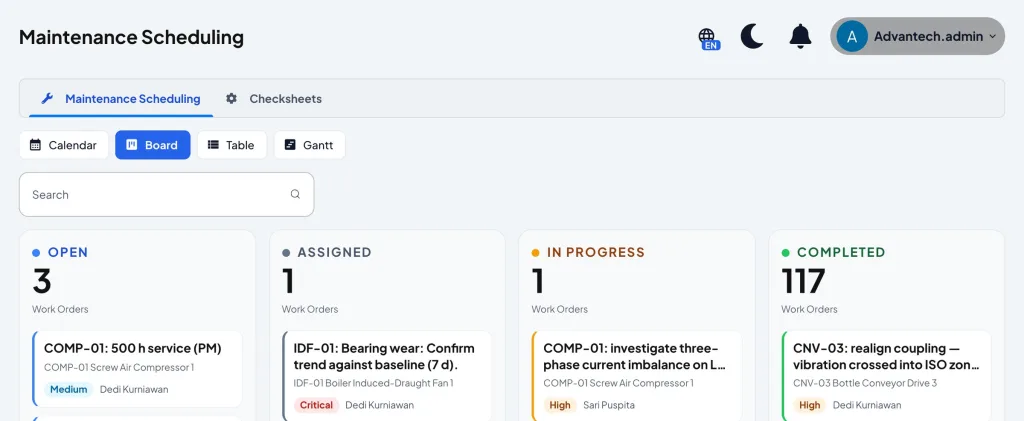
The article what is a CMMS covers the work order life cycle as process stages, from request to analysis. The view here is narrower: the status attached to a single work order and seen by everyone on the work board. Status names differ between systems, but the sequence is usually as follows.
- 01Open
- 02Approved
- 03Planned
- 04Scheduled
- 05In progress
- 06Completed
- 07Verified and closed
Open means the work order has been recorded but not yet reviewed. Approved means the job has been judged necessary and its priority set. Planned means the job plan, parts, and hour estimates are ready. Scheduled means the job has a date and people assigned. In progress means the technicians have started in the field. Completed means the technician states the job is done. Verified and closed means the result has been checked, the mandatory data is complete, and the work order can no longer be edited. Many plants also use waiting statuses, such as waiting for parts or waiting for a production shutdown, so that the reason a job is delayed is visible.
Well-recorded statuses also make scheduling measurable. Palmer makes schedule compliance the main measure of weekly scheduling performance[2]. The measure can be calculated by work order count or by labor hours. The work order count version below is simpler to start with.
Schedule compliance
Schedule compliance = scheduled WOs completed in the period ÷ WOs scheduled for the period × 100%
Illustration: of 48 work orders scheduled for one week, 42 were completed that week. Schedule compliance = 42 ÷ 48 × 100% = 87.5%.
Emergency work that breaks into the schedule is not counted as scheduled work, even though it takes up labor hours.
A work order priority matrix
Priority is the field most easily abused. Without rules, priority goes to whoever asks the loudest. A fairer approach is to judge two things separately. First, the consequence if the asset fails. Moubray groups failure consequences into hidden failure consequences, safety and environmental consequences, operational consequences, and non-operational consequences[5]. Second, the urgency: how soon functional failure is expected if the job is deferred.
| Consequence of failure | Already happening or imminent | Expected within days | Expected within weeks |
|---|---|---|---|
| Safety or environment | P1 | P1 | P2 |
| Production stops | P1 | P2 | P3 |
| Production slows or quality suffers | P2 | P3 | P3 |
| No direct effect on production | P3 | P4 | P4 |
An example to adapt, not a standard. Each plant sets its own definitions of P1 to P4 and their response time targets.
In this example, P1 means the work starts immediately and may push aside the current week's schedule. P2 goes into the schedule within a few days. P3 is planned and scheduled for the following week. P4 is done when capacity allows or combined with a shutdown. A matrix like this is useful because priority decisions can be explained and checked. It also opens a healthy conversation with production: if almost every work order ends up as P1, the problem is not the maintenance team but the condition of the assets, or the way requests are being judged.
Why paper, Excel, and WhatsApp work orders lose their history
Nearly every plant starts on paper, then moves to an Excel template, while using a WhatsApp group for urgent requests at the same time. All three can record work. The trouble starts when those records have to answer questions rather than just be stored.

Paper forms are easy to fill in but hard to search. The history of pump P-204 is scattered across monthly folders, and to find out how many times its bearing was replaced in a year, someone has to open twelve folders one by one. An Excel template is better for totaling, but it is usually held by one person, filled in at the end of a shift or a week from memory, and its free-text columns carry different wording each time: "bearing damaged", "brg worn", "replaced bearing". To a person these mean the same thing; to a formula they do not.
WhatsApp is the fastest way to report, and for exactly that reason the easiest to lose. Requests sink among photos and other conversations, have no status, and nobody knows whether a request has been done or merely read. When the technician who handled it moves on or leaves, the knowledge of that problem leaves too.
What the three have in common is that nothing forces the core data to be filled in: asset ID, failure code, labor hours, and downtime. Wireman arranges maintenance performance indicators in tiers, from the corporate level down to the functional level[6]. At the functional level, many indicators, such as schedule compliance and the share of planned work, are calculated directly from work order data. If that data is incomplete, the indicators built on it cannot be trusted. A computerized work order maintenance system does not fix discipline automatically, but it can make certain fields mandatory, lock work orders once closed, and attach every record to the right asset.
Steps to standardize work orders in a plant
Standardizing work orders does not have to wait for new software. Most of the steps below can start with the existing form and move into a system once the workflow has settled.
- Decide which questions you want answered. For example: which assets fail most often, how long repairs take on average, and how much of the work is planned. Every mandatory field on the form should serve one of those questions.
- Clean up the asset register. Every asset gets one unique ID, labeled in the field, so technicians do not have to guess the machine name.
- Build a short list of failure codes. Start with ten to fifteen failure modes that actually occur in the plant, using a mode, cause, and action structure like the one in ISO 14224[4].
- Agree the priority matrix with production. Write down the definitions of P1 to P4 and their target times, then ask the production manager to sign it too.
- Separate work requests from work orders. Anyone may report, but only certain roles approve and schedule.
- Require actual labor hours and downtime at closeout. A work order without this data may not move to closed.
- Decide who verifies. A supervisor or the asset owner checks the result before the work order is closed, and for important jobs verification is done by measurement, not only by observation.
- Review the data regularly. Discuss delayed work orders and repeat failures every week. The indicators built from this data are covered further in the article on maintenance KPIs.
Common mistakes in filling in work orders
The mistakes below are rarely visible on a single work order. Their effect shows only months later, when the data is gathered and turns out unable to answer any question.
- Free-text fields only. A free description is still needed for context, but without structured fields, identical events cannot be counted. "Pump noisy" and "P-204 bearing worn" may be the same event, yet they will never read as such.
- No failure codes. Without failure mode and cause, any analysis of repeat failures has to start by rereading hundreds of records by hand.
- Closing without verification. A work order closed the moment the technician walks away proves nothing. If the problem comes back two days later, the history records two successful repairs.
- Not recording actual labor hours. Without actual hours, estimates never improve, workload stays invisible, and the weekly schedule keeps being built on guesses.
- Raising the work order after the job is done. This erases waiting time, priority, and the plan from the record. What remains is a report, not a work order.
- One work order for many assets. Work recorded against "line 2" without a specific asset will not appear in the history of any machine.
Conclusion
The maintenance work order is the smallest unit of the whole maintenance system. Every indicator, every failure analysis, and every decision to change a maintenance strategy ultimately comes from a collection of work orders. That is why the quality of work orders matters more than their number. A good form is short enough to fill in on the floor, yet makes the data needed later mandatory: asset ID, failure code, actual labor hours, downtime, and verification.
The most realistic first step is to tidy up the form you already have: add failure codes, separate completed from closed, and require actual labor hours. After a few months, data from work orders filled in with discipline will begin to show patterns that were previously known only to the most senior technicians.
Frequently asked questions
What is a maintenance work order?
A maintenance work order is a written instruction for one maintenance job on a specific asset. It covers the asset, problem, priority, people assigned, job plan, spare parts, labor hours, downtime, findings, and verification.
What is the difference between a work request and a work order?
A work request is a report that a problem needs attention, and anyone may raise one. A work order is issued once that request has been reviewed and approved, and it becomes the basis for planning, scheduling, and recording the work.
What goes on a maintenance work order form?
At minimum: asset ID and location, problem description, failure code, priority, dates, technician, safety and LOTO notes, job plan, spare parts, estimated and actual labor hours, downtime, findings and action, and a verification sign-off.
Is an Excel maintenance work order template enough?
To get started, an Excel template can work as long as its fields are structured and its failure codes standardized. Its limits show when data has to be searched per asset, many people need to follow the status, and closed work orders must be locked against changes.
What is a work order maintenance system?
A work order maintenance system is software, usually part of a CMMS, that records requests and work orders, manages their status, and stores every job in the history of the asset it was done on.
References
- [1]European Committee for Standardization. (2017). EN 13306:2017 Maintenance: Maintenance terminology. CEN.
- [2]Palmer, D. (2019). Maintenance planning and scheduling handbook (4th ed.). McGraw-Hill Education.
- [3]Mobley, R. K. (2002). An introduction to predictive maintenance (2nd ed.). Butterworth-Heinemann.
- [4]International Organization for Standardization. (2016). ISO 14224:2016 Petroleum, petrochemical and natural gas industries: Collection and exchange of reliability and maintenance data for equipment. ISO.
- [5]Moubray, J. (1997). Reliability-centered maintenance (2nd ed.). Industrial Press.
- [6]Wireman, T. (2005). Developing performance indicators for managing maintenance (2nd ed.). Industrial Press.