
Maintenance management
CMMS vs ERP: differences, division of roles, and how to integrate them
The ERP has just gone live, and its maintenance module was switched on with it. A few months later, work orders are still written on paper and typed in again by an administrator the next morning. This article looks at what a CMMS and an ERP actually do, when one system is enough, and how to divide the work when both are in use.

Key takeaways
- An ERP is designed for transaction and cost control, while a CMMS is designed for carrying out maintenance work and keeping its history on each asset.
- ERP maintenance modules such as SAP PM already contain the core elements of a CMMS. The difference usually lies in who enters the data, where, and when.
- When both are used, every data object needs one master: the ERP for spare parts, stock value, cost centers, and purchasing; the CMMS for work order execution and history.
- Successful integrations start with a minimum exchange, namely asset and material data into the CMMS and actual costs into the ERP, and expand once a pilot is running.
What CMMS, ERP, and EAM mean
The CMMS vs ERP question tends to come up at about the same moment in many plants: the ERP project is under way or has just finished, and the maintenance manager is asked whether the team still needs a system of its own. An honest answer depends on what each system actually does, and the terms in circulation often overlap. So the definitions need to be settled first.
EN 13306 defines maintenance as the combination of technical, administrative, and managerial actions during the life cycle of an item, intended to retain it in, or restore it to, a state in which it can perform the required function[1]. The definition is useful for reading the CMMS and ERP debate. The administrative and financial side of maintenance is the natural territory of the ERP. The technical side, meaning what was done to the machine, by whom, and what was found, is the natural territory of the CMMS. Both touch the managerial side from different directions.
CMMS
A Computerized Maintenance Management System (CMMS) is a system for planning, carrying out, and recording maintenance work on each asset. Its basic functions are covered in the article what is a CMMS. For this comparison, one point is enough: its unit of work is a work order tied to an asset, and its main users are the people who plan and perform maintenance.
ERP
Enterprise Resource Planning (ERP) is a system that brings a company’s core business processes, such as finance, procurement, inventory, sales, and production, into one database. Its strength is transactional consistency. Every item received, issued, or paid for leaves an auditable accounting trail, and every cost is charged to an agreed organizational structure.
EAM and how it differs from a CMMS
Enterprise Asset Management (EAM) widens the scope from maintenance work to the whole asset life cycle: planning the need, acquisition, operation, maintenance, and finally replacement or disposal. This scope is in line with ISO 55000, which treats asset management as the coordinated activity of an organization to realize value from its assets[2]. Campbell, Jardine, and McGlynn discuss asset management as a series of decisions across the life of equipment, and those decisions depend on reliable maintenance history[3].
In practice, the line between CMMS and EAM is blurry, because many CMMS products add EAM features and the reverse. A more useful distinction is the time horizon. A CMMS answers daily questions: which jobs must be finished this week, and what came of them. An EAM answers questions that span years: when it becomes cheaper to replace a compressor than to keep repairing it.
The ERP maintenance module, for example SAP PM
Most large ERPs include a maintenance module. The best known example in Indonesia is SAP PM (Plant Maintenance), which in SAP S/4HANA is now often referred to as Plant Maintenance or Asset Management. In general terms, the module organizes assets into functional locations (the places where a function is performed) and equipment (the physical objects installed at those locations). A malfunction or request is recorded as a maintenance notification, and the work is then planned in a maintenance order that holds operations, components, labor hours, and costs. The order costs are then settled to a cost center or another cost object.
Judged by its list of functions, a module like this already contains nearly every element of a CMMS. That is why the CMMS vs SAP PM question is rarely settled by comparing features. The difference usually lies in who enters the data, where it is entered, and how complete the technical record is when the job is done.
Who each system is designed for
An ERP is designed around the needs of finance, procurement, and the storeroom. Its screens are dense with fields and codes, are mostly used at a desk, and put transaction accuracy ahead of input speed. For a cost accountant closing the books at month end, this design makes sense. A single wrong cost center code can throw off the report for a whole department.
Maintenance users work to a different rhythm. Palmer places the planner as the person who prepares the job plan, parts, tools, and hour estimates before the work is scheduled, and who uses technician feedback after the job to improve the next plan[4]. That feedback has to be captured where the work happens: by a technician with oily gloves standing next to a compressor, often in the middle of a night shift.

The difference shows up clearly in everyday events. At 2 a.m., the utility compressor trips. The technician fixes it, writes a short note on paper, and goes home. The next morning an administrator types that note into the ERP: equipment number, labor hours, and materials used. The transaction is recorded correctly, but the early symptoms, the findings on site, and the suspected cause are lost along the way. The problem is not the ERP. It is the distance between the person who knows and the screen where the data is entered.
CMMS vs ERP: a comparison from the maintenance side
The table below compares a CMMS with an ERP maintenance module on the dimensions that usually decide whether maintenance data gets filled in well. It does not judge which is better. Each column describes a common design emphasis, not the most a given product can do.
| Dimension | CMMS | ERP maintenance module |
|---|---|---|
| Main users | Planners, supervisors, technicians, and operators who report problems | Finance, procurement, storeroom, and maintenance planners |
| Unit of record | Work orders and history per asset | Transactions: orders, reservations, goods issues, and cost postings |
| Work order detail | Task steps, checksheets, photos, failure codes, and findings | Operations, components, labor hours, and costs; technical detail depends on configuration |
| Field use | Usually designed for a phone or tablet near the machine | Usually a desktop screen; mobile access needs an extra app or configuration |
| Condition data and sensors | Condition thresholds or trends can trigger a work order directly | Usually through meter readings or a custom integration |
| Spare parts | Technical use: which part, on which asset, because of which failure | Stock value, reorder points, and purchasing |
| Cost accounting | Records labor hours and materials per work order | The official source of cost: cost centers, budgets, and journals |
| Implementation effort | Can start one area at a time with a small scope | Follows the ERP project and its change governance |
| Typical fit | Plants that need execution discipline and technical history on the floor | Organizations that put cost control and central purchasing first |
This comparison is general. Actual capabilities depend on the product, version, and configuration of each system.
The most useful way to read this table is to look at the spare parts and cost accounting rows. Both systems touch the same data with different questions. The ERP asks how much the bearings in the store are worth and which cost center the expense goes to. The CMMS asks why the bearing on the same pump has already been replaced three times this year. Both questions are legitimate, and a plant needs answers to both.
When an ERP maintenance module such as SAP PM is enough
Not every plant that runs an ERP needs to add a CMMS. Adding a system means adding an interface to maintain, users to train, and one more place where data can fall out of sync. An ERP maintenance module is usually adequate under the following conditions.
- Most maintenance work is outsourced. If contractors do the repairs and the plant mainly manages their purchase orders and invoices, the weight of the work really does sit in procurement.
- The asset count is small and the assets are simple. Planners can enter the results of the work themselves without losing important detail.
- Field access is already in place. The company has set up a mobile app or terminals in the production area, and technicians actually use them.
- Governance requires a single system. Group policy or auditors require every maintenance transaction to live in the ERP, and the team is ready to adapt the way it works.
The word "enough" here has to be proven with data, not with a feature list. A module that has been switched on is not necessarily being used as intended. Check the last few hundred maintenance orders: are the failure codes filled in, are actual labor hours recorded, and are orders closed within a reasonable time? Indicators like those covered in the article maintenance KPIs can only be calculated when the underlying data is complete.
Where a separate CMMS earns its place
If the test above fails, the gaps usually appear in the same five places. All of them sit on the technical side of maintenance, where an ERP is generally not designed to excel.
Execution in the field
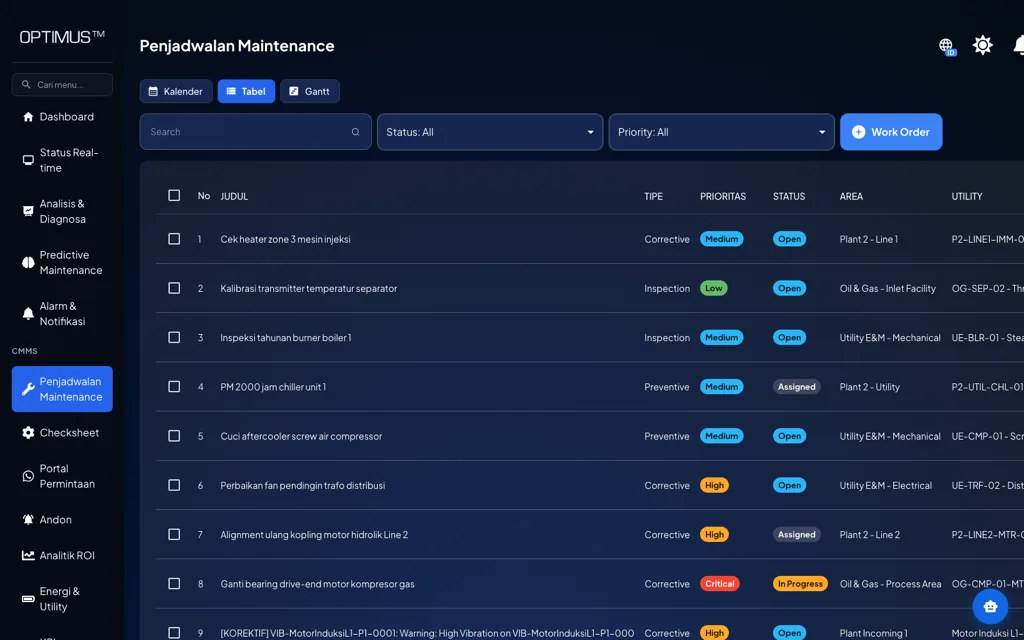
A CMMS is usually designed so that technicians can receive tasks, see the asset history, photograph findings, and close work orders from a phone next to the machine. A few minutes of difference in how input works decides whether a record is filled in on the spot or put off until the end of the shift. What a good work order form contains is covered separately in the article maintenance work orders.
Checksheets and routine inspections
A daily round in the compressor room or a weekly check of electrical panels produces many small readings: oil level, temperature, noise, and leaks. In an ERP, this kind of work is often recorded only as a single completed order, without the values that were read. A CMMS stores every checksheet item as data, so abnormal findings can be passed on as corrective work orders and the trend of the readings can be seen.
Failure codes that can be analyzed
ISO 14224 organizes reliability and maintenance data into a layered equipment taxonomy and records each failure with its failure mode, mechanism, cause, and the way the failure was detected[5]. This structure can be configured in an ERP or a CMMS. What matters is whether technicians fill it in. Failure codes that only an office administrator can enter tend to end up as "other", and a history like that cannot support root cause analysis.
Preventive maintenance compliance
Wireman arranges maintenance indicators in tiers, from the corporate and financial levels down to the tactical and functional levels within maintenance[6]. PM compliance belongs to these lower tiers: it needs an honest due date and completion date for every task. If closing an order depends on an administrator copying from paper, the recorded date is the date of copying, not the date of the work. How to build the schedule and set its intervals is covered in the article preventive maintenance.
Condition-based triggers
EN 13306 distinguishes condition-based maintenance, which is triggered by monitoring the state of an asset, from scheduled maintenance based on intervals[1]. For this approach to work, a vibration or temperature value that crosses a limit has to become a work order addressed to the right person. A CMMS connected to condition data usually handles this flow directly, whereas in an ERP the same flow often requires additional development.
CMMS integration with ERP: which system owns which data
When a CMMS and an ERP are used together, the first principle is simple: each data object has only one master (system of record). The other system may read it or keep a copy, but may not change it on its own. Without this rule, the two systems slowly come to hold two versions of the truth, and the monthly meeting is spent deciding which number is right.
| Data object | Master | Reason |
|---|---|---|
| Technical asset hierarchy, specifications, and criticality | CMMS | Maintained by the team that knows the machines |
| Fixed assets for accounting (book value and depreciation) | ERP | Governed by accounting policy and audit |
| Spare part master and stock value | ERP | Inventory value must match the books |
| Cost centers and maintenance budgets | ERP | The cost structure belongs to finance |
| Purchase requisitions and purchase orders | ERP | Approvals and supplier data are managed centrally |
| Work order execution and history | CMMS | Recorded where the work takes place |
| Actual cost per work order | Calculated in the CMMS, posted to the ERP | The ERP remains the official ledger |
In companies whose technical asset register is already complete in the ERP, the asset master can stay in the ERP and be copied to the CMMS. What matters is that each object has only one master.
The first two rows often cause confusion. A single fixed asset in the books can consist of dozens of maintained items. A filling line, for example, may be recorded by finance as one asset, while on the floor it consists of motors, pumps, conveyors, and panels, each with its own history. The two lists do not need to match; what they need is a linking key, so that every technical item knows which fixed asset and cost center it belongs to.
- 01Work request
- 02Work order (CMMS)
- 03Spare parts (ERP)
- 04Execution (CMMS)
- 05History (CMMS)
- 06Actual cost (ERP)
The flow begins when an operator reports a problem, for example a cooling pump that sounds rough. The planner creates a work order in the CMMS, writes the task steps, and lists the spare parts needed. Palmer stresses that parts availability should be confirmed before the job is scheduled[4], so at this stage the CMMS asks the ERP to reserve stock, or raises a purchase requisition if the stock is empty. Purchase approval still runs in the ERP. Once the parts are ready, the technician does the job and closes the work order in the CMMS with the labor hours, the materials actually used, the failure code, and the findings. That technical history stays in the CMMS, while a cost summary is posted to the ERP.
The figures below are illustrative. A pump bearing replacement work order uses 2 bearings at Rp 450,000 each, or Rp 900,000. The job is done by 2 technicians over 3 hours, or 6 labor hours, at an internal rate of Rp 75,000 per hour, or Rp 450,000. The actual cost posted to the pump area’s cost center is Rp 1,350,000. In the ERP, this figure appears as maintenance cost for the area. In the CMMS, the same figure is attached to a specific pump, a specific failure, and a specific date.
Not every exchange needs to happen instantly. Asset and material master data can be synchronized periodically, while stock reservations and purchase requisition status are better updated faster because they affect the work schedule. Costs can be posted per work order or summarized per period, depending on what cost accounting needs.
Steps to decide and to integrate
The sequence below helps you make the decision with data and then carry out the integration with controlled risk.
- Map the current flow. Follow one job from the breakdown report to the point where its cost is recorded, and mark every point where data is retyped, delayed, or lost.
- Test the existing ERP module with technicians. Use the three questions in the box above, and involve the people who actually hold the tools, not only the ERP project team.
- Assign a master to every data object. Use Table 2 as a starting point, then agree on the linking keys: asset ID, material code, and cost center.
- Clean up the spare part master before integrating. Duplicate codes for the same item, inconsistent units, and unclear descriptions will be copied into the CMMS unless they are cleaned up first.
- Start with the minimum integration. Send asset, material, and cost center data to the CMMS, and send actual costs to the ERP. Automatic stock reservations and purchase requisitions can follow.
- Run a pilot in one area. Choose an area with critical assets, run the full cycle for a few weeks, and reconcile the costs in the ERP with the work orders in the CMMS.
- Set data owners and change rules. Decide who may create new asset codes, new material codes, and new cost centers, and in which system each change starts.
Common mistakes when running a CMMS and an ERP together
Most integration problems are not technical interface problems but design decisions made too early. The following mistakes are common.
- Forcing technicians to type into a finance screen. A screen designed for cost accounting makes technicians put off recording, and technical detail is the first thing lost.
- Two asset masters running independently. A new pump is registered in the CMMS but not in the ERP, or the other way around. Within a few months, costs can no longer be tied to their assets.
- Integrating everything on day one. Every additional flow adds a point of failure. Projects that try to synchronize every object at once are often delayed before a single flow is actually in use.
- Spare parts issued without a work order. If items can be taken from the store without a work order number, the ERP records the stock going down, but the CMMS does not know which asset used it.
- Treating integration as an IT project only. Without owners from maintenance and finance, master data rules are never agreed, and the interface only moves the mess from one system to the other.
There are also limits worth admitting. Integration does not fix bad data; it only copies it faster. Having a CMMS does not automatically make assets more reliable either. Its value appears only when the recorded history is actually read and used to change the maintenance plan.
Conclusion
The CMMS and ERP debate becomes clearer once the question changes. The question is not which system is more complete, but where each type of data is best recorded and who knows its content best. The ERP is the right place for stock value, purchasing, cost centers, and official costs. The CMMS is the right place for work execution, checksheets, failure codes, and the technical history of each asset.
For a plant that already runs an ERP, the sensible first step is to test whether its maintenance module is really being filled in by the people on the floor. If it is, one system may be enough. If it is not, a CMMS connected to the ERP with a clear division of master data is usually more realistic than forcing technicians to work on screens that were not designed for them.
Frequently asked questions
CMMS vs ERP: what is the difference?
An ERP manages a company’s business transactions, such as finance, procurement, and inventory. A CMMS manages the execution and history of maintenance work on each asset, and is usually designed for planners and technicians in the field.
Is SAP PM a CMMS?
Functionally, yes. SAP PM includes functional locations, equipment, notifications, and maintenance orders. The difference from a separate CMMS usually lies in ease of input in the field and the completeness of technical records, not in the feature list.
What is the difference between a CMMS and an EAM?
A CMMS focuses on daily maintenance work and its history. An EAM covers the whole asset life cycle, from acquisition to replacement or disposal, in line with the asset management principles of ISO 55000.
How do you integrate a CMMS with an ERP?
Assign one master to every data object. A common pattern is for the ERP to hold spare parts, stock value, cost centers, and purchasing, while the CMMS holds work order execution and history and sends actual costs to the ERP.
Does a company that already runs an ERP still need a CMMS?
Not always. If technicians can record their work directly in the ERP and the data is complete, one system may be enough. A separate CMMS is worth considering when maintenance data is still copied from paper or failure codes are rarely filled in.
References
- [1]European Committee for Standardization. (2017). EN 13306:2017, Maintenance: Maintenance terminology. CEN.
- [2]International Organization for Standardization. (2024). ISO 55000:2024, Asset management: Vocabulary, overview and principles. ISO.
- [3]Campbell, J. D., Jardine, A. K. S., & McGlynn, J. (Eds.). (2011). Asset management excellence: Optimizing equipment life-cycle decisions (2nd ed.). CRC Press.
- [4]Palmer, D. (2019). Maintenance planning and scheduling handbook (4th ed.). McGraw-Hill Education.
- [5]International Organization for Standardization. (2016). ISO 14224:2016, Petroleum, petrochemical and natural gas industries: Collection and exchange of reliability and maintenance data for equipment. ISO.
- [6]Wireman, T. (2005). Developing performance indicators for managing maintenance (2nd ed.). Industrial Press.